- Published on
SitecoreAI Forms — What I learned on a real-world implementation
- Authors

- Name
- Mark Gibbons
- @markgibbons25
In a recent Sitecore XP to SitecoreAI rebuild for a large client, we chose to use SitecoreAI Forms as a replacement for their existing Sitecore XP Forms solution.
The client had hundreds of forms, mostly fairly simple “enquiry” style marketer forms across their 8 websites. These types of marketing forms are usually ideal for off-the-shelf form builder products as they are usually fairly simple, can be templatized, and just need minor variations and configuration of submission handling.
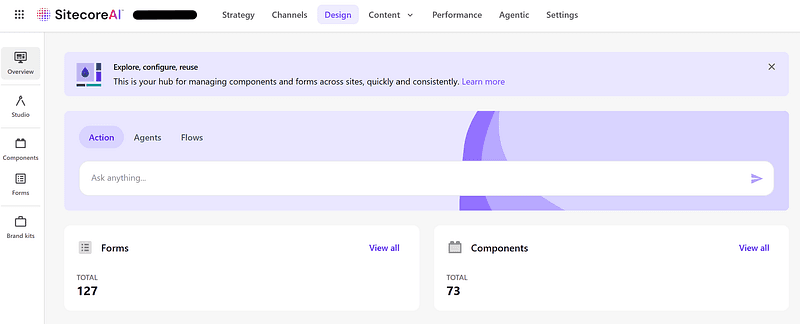
SitecoreAI Design Library
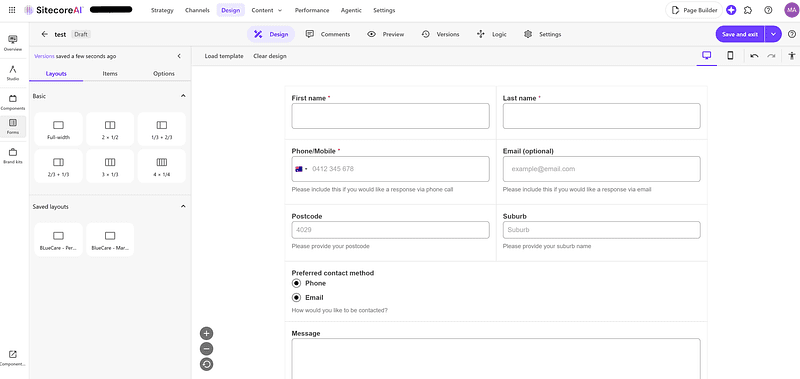
SitecoreAI Form Builder
Features of SitecoreAI Forms
- The brand-new Form Builder makes creating forms fast and easy, with instant preview across mobile and desktop breakpoints. Fully WYSIWYG.
- It’s backed by Sitecore’s BYOC / Design Library technology which means it feels like a native component on your site (once you’ve applied your brand styling). No iFrames which is a key differentiator from most other form products out there.
- Has a pretty comprehensive suite of form field components — everything you could want for simple and medium complexity forms.
- There is no form submission saving mechanism out of the box — you have to configure form submissions to go somewhere, and that somewhere is fully composable. You can build your own API endpoint that processes the form submissions or use a 3rd party SaaS service.
- Native Sitecore Page Builder support in terms of seeing your form library and adding a form to a page.
- Reliability looks good — I’ve not noticed any outages on the front-end and SitecoreAI Forms are backed by the standard SitecoreAI Cloud SLAs. The Form Builder app did go down for a few hours briefly earlier in the year but that was part of a major migration Sitecore’s side so we’ve put that down to a one-off.
Pain Points
Of course, no product is perfect, especially a relatively new one. Here’s some issues we have encountered.
- Conditional rendering seems to be full featured on the surface but a key use case that is not supported currently is being able to show/hide standard Rich Text fields and the form Submit Button itself. The use case is that depending on options selected in an Enquiry Type dropdown, we wanted to show a content block to direct users to another page and prevent them from submitting the current form. I have requested this as a feature via Sitecore Support — ref DESIGNLIB-4116.
- File Uploads are decent; files are uploaded to a Sitecore Azure Blob Storage container. However, they only stay there for 60 minutes so if you need the file for longer than that, you have to copy the file to your own storage.
- Copying forms between environments and restricting them to be able to be added to certain sites on an environment is easy. However, there is nothing preventing forms being packaged up as part of a Sitecore content package and installed on other environments. What I would like to see here is configurability of Webhooks
- There’s no easy way to see what forms are using which Webhooks. You have to go form by form and see what Webhook is configured. I’d love to see a report on each Webhook of which forms are using it. Our client has hundreds of forms so manually going form by form is very painful.
- There’s no easy way to see what pages are using which forms. This is sort of doable via a custom SPE script, but I’d expect it to be part of the product.
- There’s no way to hide the form totally on completion and just show a CTA block. Your options are to show a success message (which just resets the form) or redirect to a new page.
Official extension points
It would be nice to have more docs on official extension points. We were able to add custom hidden fields as we needed for business logic by adding window.addEventListener(‘form:engage’, ...) logic as documented here, also things like swapping out icons on the File Upload field.
Theoretically I’d say we could use this to add custom validators or customise fields, but I’ve not done that yet, a little worried that over time such changes would break if things change on Sitecore’s side.
It would also be good for guidance on what css classes can be overridden. We wanted to style forms via our Tailwind based design system, so have targeted classes like .form-input-element , but there is a risk these could change in the future.
Form Submission Handling
Our client had fairly complex requirements about form submissions, requiring submissions to go to different CRMs or inboxes depending on the site and page, and even down to Enquiry Type selection on specific forms.
To handle this, we built a custom API endpoint and made the configuration available in Sitecore. Without going too much into detail, an author could set a Form ID and configure what actions to take for that form’s submissions.
Conclusion
Overall, I am fairly happy with the product, and so is the client, it is production ready, but by addressing some of the above friction points and improving extensibility I’m sure it could become truly outstanding.