- Published on
Sitecore Datasource Item And Children Resolver
- Authors

- Name
- Mark Gibbons
- @markgibbons25
The XM Cloud compatible ways to retrieve the datasource item fields + child datasource item fields
The XM Cloud product team has made it very clear.
- DO NOT MODIFY THE LAYOUT SERVICE
- DO NOT WRITE CUSTOM LAYOUT SERVICE PIPELINE PROCESSORS
Stick to the above and future you will thank you.
So, a common requirement is to have a rendering, let’s say for example a Footer component, where you want to retrieve the datasource item, as well as any children of it.
Unfortunately, Sitecore haven’t ever added a rendering contents resolver OOTB for this. But we do have 4 good options.
Option 1 — Sitecore Datasource Item And Children Resolver
- Navigate to
/sitecore/system/Modules/Layout Service/Rendering Contents Resolversand find the Datasource Item Children Resolver. - Duplicate it and give it a name
Datasource Item And Children Resolver. - Change the Item Selector Query to the following:
./descendant-or-self::*
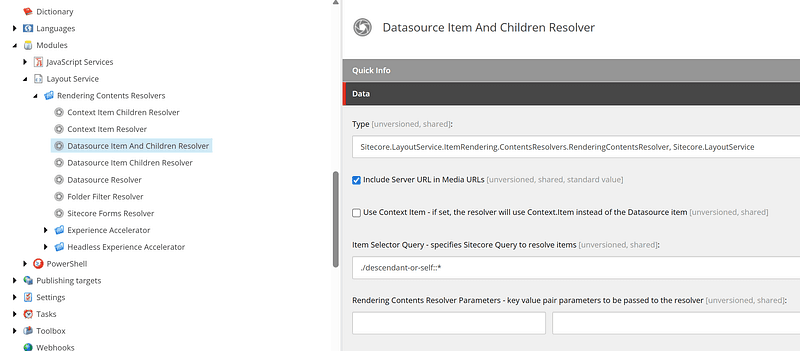
- Update your rendering to use this field
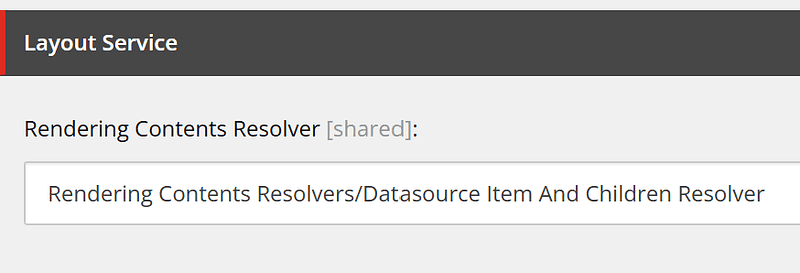
Your new GraphQL layout response will now have the data in the format:
fields: { items: [ Datasource Item, Child Item 1, Child Item 2, ... ] }
The down side of this method is the unusual structure, but once that is handled in a robust way it works well enough.
Option 2 — Integrated GraphQL
https://doc.sitecore.com/xmc/en/developers/jss/latest/jss-xmc/integrated-graphql-in-jss-apps.html
This option is fine for simple queries like this. I have confirmed with the Sitecore product team that this technique is here to stay.
    query ($datasource: String!, $language: String!) {
      datasource: item(path: $datasource, language: $language) {
        children(first: 90) {
          results {
            field(name: "Link") {
              link: jsonValue
            }
          }
        }
        field(name: "LogoImage") {
          logoImage: jsonValue
        }
        field(name: "LogoLink") {
          logoLink: jsonValue
        }
      }
    }
It is NOT good for things like site navigations. For that I’d recommend Option 3 below.
Another down side with this option is that it decouples your GraphQL code from your component which isn’t ideal from a code maintenance and reuse point of view.
Option 3 —Custom GraphQL from getComponentServerProps/getStaticProps
This is the option I’d recommend for complex components such as Navigations. It keeps the data out of the layout service altogether, and for Navigations that can be a LOT of data, which really slows down publishing.
Option 4 — Add child items via Placeholders
But wait! There’s more!
This is one pointed out by Bas Lijten once he read this article. He says that if you add all the datasource items to the page, one by one, via placeholders, then this offers a lot more flexibility when it comes to Personalisation and A/B testing.
This makes a lot of sense — authors can quickly apply personalisation or A/B testing rules to particular items instead of needing to duplicate whole trees of datasources which leads to a content maintenance issue.
The down side from a code point of view is the additional development effort of configuring the placeholders, setting restrictions on what can be added to those placeholders, and then writing tests that utilise the placeholders is an additonal layer of abstraction. So as with any of these options, it would be a case by case basis.