- Published on
Sitecore SXA — How to override the Search Controller to fix the Cache-Control header
- Authors

- Name
- Mark Gibbons
- @markgibbons25
This article explains how to swap out the built-in SXA SearchController which handles the API for the Search Results component. I needed to do this as the response headers for this was resulting cache-control: no-cache instead of cache-control: no-store as I need the latter to prevent caching by CDN’s such as Azure Front Door.
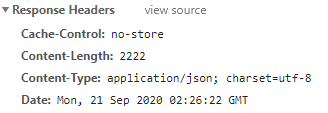
The following is for SXA in Sitecore 9. Caching for this particular case is now configurable in Sitecore 10 (there is a new cachingHeaders configuration), but this might be a useful technique if you need to replace built-in Sitecore controllers.
Set up the cache attribute
Create a new class:
[AttributeUsage(AttributeTargets.Method)]
public class CacheWebApiAttribute : ActionFilterAttribute
{
    public override void OnActionExecuted(HttpActionExecutedContext filterContext)
    {
        filterContext.Response.Headers.CacheControl = new CacheControlHeaderValue
        {
            NoStore = true
        };
    }
}
Create the Controller override:
public class XASearchOverrideController : Sitecore.XA.Feature.Search.Controllers.SearchController
{
    [RegisterSearchEvent]
    [CacheWebApi]
    public ResultSet GetResultsOverride([ModelBinder(BinderType = typeof(QueryModelBinder))] QueryModel model)
    {
        return base.GetResults(model);
    }

    [CacheWebApi]
    public FacetSet GetFacetsOverride([ModelBinder(BinderType = typeof(FacetsModelBinder))] FacetsModel model)
    {
        return base.GetFacets(model);
    }

    [CacheWebApi]
    public SuggestionsSet GetSuggestionsOverride([ModelBinder(BinderType = typeof(QueryModelBinder))] QueryModel model)
    {
        return base.GetSuggestions(model);
    }
}
Remove the old one from DI and add our new one
You need a IServicesConfigurator to remove the default:
public void Configure(IServiceCollection serviceCollection)
        {
            serviceCollection.Remove(serviceCollection.Single(x => x.ServiceType == typeof(Sitecore.XA.Feature.Search.Controllers.SearchController)));
            serviceCollection.AddTransient<My.Controllers.XASearchOverrideController>();
        }
Register the route handler
public class RegisterRoutes
{
    public void Process(PipelineArgs args)
    {
        foreach (string virtualdir in ServiceLocator.ServiceProvider.GetService<ISiteInfoResolver>()
            .Sites.Select<SiteInfo, string>((Func<SiteInfo, string>)(s => s.VirtualFolder.Trim('/'))).Distinct<string>())
        {
            string sitepath = virtualdir.Length > 0 ? virtualdir + "/" : virtualdir;
            //RouteTable.Routes.MapHttpRoute(sitepath + "sxa", sitepath + "sxa/{controller}/{action}").RouteHandler = new SessionHttpControllerRouteHandler();
            RouteTable.Routes.MapHttpRoute(
                name: sitepath + "sxaresults",
                routeTemplate: sitepath + "sxa/search/results",
                defaults: new { controller = "XASearchOverride", action = "GetResultsOverride" }
            ).RouteHandler = new SessionHttpControllerRouteHandler();
            RouteTable.Routes.MapHttpRoute(
                name: sitepath + "sxafacets",
                routeTemplate: sitepath + "sxa/search/facets",
                defaults: new { controller = "XASearchOverride", action = "GetFacetsOverride" }
            ).RouteHandler = new SessionHttpControllerRouteHandler();
            RouteTable.Routes.MapHttpRoute(
                name: sitepath + "sxasuggestions",
                routeTemplate: sitepath + "sxa/search/suggestions",
                defaults: new { controller = "XASearchOverride", action = "GetSuggestionsOverride" }
            ).RouteHandler = new SessionHttpControllerRouteHandler();
        }
    }
}
Patch out the built-in route handler and patch ours in:
<sitecore>
    <pipelines>
      <initialize>
        <processor patch:instead="processor[@type='Sitecore.XA.Feature.Search.Pipelines.Initialize.InitializeRouting, Sitecore.XA.Feature.Search']"
           type="My.Pipelines.RegisterRoutes, ALS.Feature.XaComponents" />
      </initialize>
    </pipelines>
  </sitecore>
That’s all — it is fairly involved but at least it is possible.